
DoEarn
Just Now
49MB
1.2.4
Android 6+
17.5K
Description
Finding small online earning opportunities can be difficult for people who are new to freelancing or do not have advanced digital skills. DoEarn APK takes a simpler approach by giving Android users different activities that can be completed from a mobile phone. These activities may include online tasks, rewarded advertisements, surveys, app offers, daily activity, and referrals.
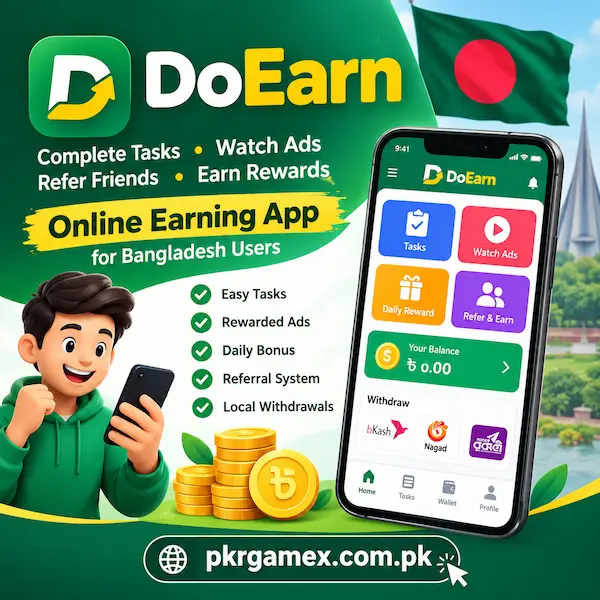
The platform is mainly focused on users in Bangladesh and supports both Bangla and English. It also lists local withdrawal options such as bKash, Nagad, and Rocket, which can make the payment process more familiar for Bangladeshi users. However, task availability, rewards, and payment conditions can change, so users should always check the latest information inside the app before starting.
What Is DoEarn APK?
This is an Android-based task-to-earn platform developed by ProWebBD. Its earning model is different from traditional freelancing websites because users do not need to search for clients or create proposals for every job.
Instead, the app displays different activities. A user can select an available task, read its requirements, complete the requested action, and wait for the activity to be verified.
Depending on the current offers, activities may include social media actions, surveys, app-related tasks, and other digital assignments. Rewarded videos and referral activities provide additional ways for users to participate.
The amount available from a task is not necessarily the same every time. Offers can change according to the campaigns available on the platform.
DoEarn App Details
| Information | Details |
|---|---|
| App Name | DoEarn |
| Developer | ProWebBD |
| Category | Task-to-Earn |
| Main Market | Bangladesh |
| Languages | Bangla and English |
| Registration | Google or Email |
| Activities | Tasks, Ads and Referrals |
| Local Payment Options | bKash, Nagad, Rocket |
| KYC | Supported |
| Joining Cost | Free |
These details describe the platform information available in the reference material. Some features or payment options may change after an app update.
How Does APK Work?
DoEarn follows a relatively straightforward process. After creating an account, users can open the task section and look through the activities currently available.
Each offer can have its own instructions and reward. Before starting, it is better to read the requirements carefully. Some tasks may require a particular action to be completed within specific conditions.
Once the required activity has been completed, the platform can verify it before adding the reward to the account balance.
This means users should not assume that every action will automatically produce a reward. Completing the exact requirements of an offer is important.
Main Ways to Earn on This App
The app provides several activities instead of depending on only one earning method.
Complete Available Tasks
Tasks are one of the main parts of the platform. Depending on the current campaigns, users may find activities related to social media, surveys, applications, or other online actions.
The reward and instructions can be different for each offer. Checking these details before beginning can help users avoid spending time on a task they cannot complete.
Watch Rewarded Videos
DoEarn also includes rewarded advertisements. Eligible users can watch advertisements available inside the app and receive the reward shown for the activity.
The number of available advertisements may not remain constant. Therefore, users should treat this as an additional activity rather than expecting a fixed daily amount.
Daily Activity
Regular activity is another part of the platform. The app includes daily rewards and a seven-day streak system, encouraging users to return regularly.
The exact reward conditions should be checked inside the current version of the app because promotional systems can change.
Referral Program
The App also provides a referral system. Users can invite other people through their referral connection and may receive rewards related to eligible activity generated by referrals.
The reference information describes two referral levels, with Level 1 and Level 2 rewards. Since referral conditions can be updated, users should check the current referral section before relying on specific percentages.
For Bangladeshi Users
One of the more relevant aspects of DoEarn for Bangladesh is its local focus.
The app supports Bangla as well as English, allowing users to select a language they are more comfortable with. It also lists Bangladeshi mobile financial services including bKash, Nagad, and Rocket among its withdrawal methods.
For beginners, this can make the basic account and payment process easier to understand compared with platforms that only provide international payment services.
Still, payment availability can depend on the current account and platform rules, so the withdrawal page should be checked before making a request.
How to Download The APK
The safest approach is to use the official app-store listing when the application is available there. Users should verify the application name and developer before installing it.
A simple installation process is:
- Open the official app store on your Android phone.
- Search for DoEarn.
- Check that the developer is listed as ProWebBD.
- Review the application information.
- Tap the Install option.
- Wait until installation is completed.
- Open the app and start the registration process.
Avoid installing modified or unknown copies simply because they promise extra rewards. An unofficial file can create unnecessary security and account risks.
How to Create an Account?
The registration process is designed to be relatively simple. The available information states that users can register through Google or email.
Generally, the process involves:
- Open App after installation.
- Select Google or email registration.
- Provide the requested information.
- Complete account verification.
- Complete KYC if it is requested.
- Access the main dashboard.
Use your own information when completing account verification. Incorrect details can create problems later when using account or payment-related features.
Login Process
Existing users should use the same Google account or email that was connected to their DoEarn account.
Keeping the original login method can help maintain access to task history, referrals, and balance information.
Users should also avoid creating unnecessary duplicate accounts. The platform states that it uses device protection and fraud detection to identify suspicious or duplicate-account activity.
KYC Verification
KYC means Know Your Customer verification. It is used to confirm account information before certain functions are completed.
If DoEarn asks for verification, users should provide accurate information belonging to themselves. This is particularly important when using payment or withdrawal functions.
The platform also states that withdrawal requests can be manually confirmed. Keeping account information consistent can therefore make account management easier.
How to Withdraw Money from This App?
Withdrawal becomes available after an account reaches the required balance and meets the current conditions.
The reference information lists a $1 minimum withdrawal, although this can change in future updates. Users should confirm the current minimum directly from the withdrawal section before submitting a request.
Available methods listed in the app information include:
| Withdrawal Option | Payment Type |
|---|---|
| bKash | Mobile Financial Service |
| Nagad | Mobile Financial Service |
| Rocket | Mobile Financial Service |
| Bank Transfer | Bank Payment |
| Binance USDT TRC20 | Digital Asset Transfer |
| PayPal | Online Payment |
Not every option should be assumed to be available for every account at all times. The withdrawal screen is the best place to confirm the currently supported method.
bKash and Nagad Withdrawal
For users in Bangladesh, bKash and Nagad are important local payment options listed by the platform.
Before submitting a withdrawal request, carefully check the mobile number or payment details entered into the account. A small mistake in payment information can create avoidable problems.
Users should also review the latest withdrawal requirements because payment rules and available options can change.
Is This APK Free to Use?
According to the available platform information, DoEarn does not require an investment or joining payment. Its model is based around completing eligible activities, advertisements, and other platform-supported earning methods.
This does not mean that users should expect a fixed income. The amount a person can receive depends on the number of suitable activities, their individual rewards, successful completion, and account eligibility.
It is better to consider DoEarn as a small task-reward platform rather than a replacement for a regular salary.
Tips for Using, More Effectively
Users can make their experience easier by checking the task requirements before beginning an activity.
A few useful habits include:
- Read the complete task instructions first.
- Check the displayed reward before starting.
- Do not leave required steps incomplete.
- Keep account information accurate.
- Check new tasks regularly.
- Use your own payment account details.
- Keep login information private.
- Review withdrawal requirements before requesting payment.
Task availability can change during the day, so a task that is unavailable at one moment may appear later.
Common Issues
Task Reward Is Not Added
First, check whether all required steps were completed. Some activities need verification before the reward appears in the balance.
Unable to Log In
Try using the same Google account or email that was used during registration. Using another login method may open a different account or fail to connect with the original profile.
Withdrawal Is Not Available
Check the current balance, KYC status, and withdrawal conditions shown in the app. Payment options can also change.
Very Few Tasks Are Showing
Task campaigns are not necessarily permanent. If the list is short, check again later for newly available offers.
App Is Not Working Correctly
Make sure you are using the latest official version. Restarting the application and checking the internet connection can also help with basic technical problems.
Account Security
An earning account can contain personal information as well as payment details, so account security should not be ignored.
Never give your password, verification code, or sensitive payment information to another person. Use your own account and payment details when completing KYC or withdrawal-related steps.
The platform states that it uses features such as KYC, fraud detection, device protection, and manual withdrawal confirmation. Users should still take normal security precautions on their own device.
Advantages and Limitations
| Advantages | Limitations |
|---|---|
| No joining investment stated | Task availability can change |
| Simple task-based model | Rewards depend on completed activities |
| Bangla and English support | Some activities may require verification |
| Local payment options listed | Payment methods may change |
| Daily activity option | Internet connection is needed |
| Referral system | Earnings are not fixed |
Who Is DoEarn Suitable For?
It may be worth exploring for Android users who want to try small online tasks without entering traditional freelancing.
It can be especially understandable for beginners because users can select from available activities instead of competing for freelance projects or searching for clients.
However, the platform should be approached with realistic expectations. Task-based applications do not guarantee a fixed amount of income. Results can depend on available campaigns, reward values, successful task completion, and account conditions.
Final Thoughts
DoEarn offers a task-based approach to online earning for Android users, with a particular focus on Bangladesh. Instead of requiring users to invest money or build a traditional freelance profile, it provides activities such as digital tasks, rewarded advertisements, daily participation, and referrals.
Its support for Bangla and English, along with listed local withdrawal options such as bKash, Nagad, and Rocket, makes the platform relevant to Bangladeshi users.
Anyone considering DoEarn should first understand how its tasks and withdrawal requirements work. Rewards and available activities can change, so the latest information shown inside the application should always be treated as the current reference.
Frequently Asked Questions
Is DoEarn available for users in Bangladesh?
Yes. The platform is designed with Bangladesh users in mind and provides both Bangla and English language support.
What can I do to earn through DoEarn?
Depending on available campaigns, users may find tasks, rewarded advertisements, surveys, app-related offers, daily activities, and referral opportunities.
Does DoEarn support bKash?
bKash is listed among the withdrawal methods provided by the platform. Users should check their current withdrawal screen to confirm availability and requirements.
Do I need to deposit money to join DoEarn?
The available platform information states that registration and participation are free and do not require an investment.
What is the minimum withdrawal amount?
The referenced app information lists the minimum withdrawal as $1. This can change, so users should confirm the current amount inside the withdrawal section before making a request.
Download links
How to install DoEarn APK?
1. Tap the downloaded DoEarn APK file.
2. Touch install.
3. Follow the steps on the screen.