
Gymmane
Just Now
13MB
v1.0.0
Android 6+
1 Million
Description
Keeping a consistent record of your training can make strength workouts much easier to plan and evaluate. Instead of trying to remember which exercises you performed, how much weight you lifted, or how many repetitions you completed, a dedicated workout tracker can keep that information organized.
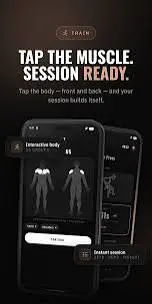
Gymmane is an Android fitness application focused on workout logging, strength training, exercise discovery, routines, and progress tracking. Rather than concentrating on social features or an online fitness community, the app is built around helping users manage their personal training information.
One of the notable aspects of Gymmane is its offline-focused approach. Workout information can be managed locally on an Android device, making the application useful for people who want to track their sessions without depending on a continuous internet connection.
What Is Gymmane?
Gymmane is an Android workout and strength-training tracker that works as a digital alternative to a traditional gym notebook.
Users can record exercises, sets, repetitions, weights, workout sessions, and other training information. Over time, these records can be reviewed to understand how training performance has changed.
The application also provides tools for finding exercises according to different muscle groups. This can be helpful when planning a workout because users can explore movements for a particular area rather than searching through an unrelated list of exercises.
Gymmane is also an open-source project, which makes it different from many fitness applications built primarily around accounts, subscriptions, advertising, or online communities.

How Does Gymmane Work?
The basic idea behind Gymmane is straightforward: select or create exercises, organize them into routines, perform your workout, and record the results.
For example, a user can create a routine containing several exercises and then enter the number of sets, repetitions, and weight used during the session. Those records can later be compared with previous workouts.
This approach is particularly useful for progressive strength training, where keeping track of previous performance can help users understand whether they are gradually increasing their workload.
The app can therefore serve several purposes:
- Recording individual gym sessions
- Building repeatable workout routines
- Checking previous exercise performance
- Monitoring personal records
- Reviewing training activity
- Keeping body measurements
- Using fitness-related calculators
Main Features of Gymmane
Gymmane combines workout logging with several tools designed around strength and fitness tracking.
| Feature | Purpose |
|---|---|
| Exercise library | Find exercises for different training areas |
| Muscle map | Explore exercises by muscle group |
| Workout logging | Record sets, repetitions and weights |
| Workout routines | Organize exercises into repeatable sessions |
| Rest timer | Manage recovery time between sets |
| Progress tracking | Review training activity and performance |
| Personal records | Keep track of important performance milestones |
| Fitness calculators | Perform common fitness-related calculations |
| Measurement tracking | Record bodyweight and measurements |
| Offline operation | Use core tracking features without relying on internet access |
| Data import | Move workout history from supported trackers |

Interactive Muscle Map and Exercise Selection
Finding the right exercise is an important part of building a workout.
Gymmane includes an interactive muscle map that allows users to explore different areas of the body. Selecting a muscle group can help users discover exercises associated with that area.
This visual method can be useful for beginners who may not know the names of many exercises. Instead of remembering a specific movement name, they can start with the muscle they want to train.
For experienced users, the feature can also provide a convenient way to browse movements when creating or modifying a routine.
Workout Logging
Workout logging is at the center of the Gymmane experience.
During a training session, users can record information such as:
- Exercise performed
- Weight used
- Repetitions completed
- Number of sets
- Set information
- Workout notes and history
Keeping these records can eliminate the need to estimate previous performance from memory.
For instance, if you performed an exercise with a particular weight during your last session, the previous record can help you decide how to approach the next workout.
Consistent logging is especially useful for users following progressive training programs because small improvements can be difficult to remember when several exercises are performed throughout the week.
Creating Workout Routines
Repeating a structured workout becomes easier when the exercises are saved as a routine.
Gymmane allows users to organize exercises into customized workout routines. A routine can represent a particular training day or a complete workout session.
A user might create routines such as:
- Chest and triceps
- Back and biceps
- Leg day
- Shoulder workout
- Full-body training
The exact structure can be adjusted according to the user’s training program.
Saved routines are useful because users do not have to manually select every exercise each time they begin a familiar workout.

Rest Timer for Training Sessions
Rest time between sets can affect the flow of a workout. Gymmane includes a built-in rest timer that can help users manage these breaks.
After completing a set, a user can start the timer and prepare for the next exercise while the countdown runs.
This can be more convenient than repeatedly checking the phone’s standard clock.
Different exercises may require different recovery periods, so having a dedicated timer inside the workout tracker keeps the process in one application.
Gymmane Progress Tracking
A workout diary becomes more valuable when users can look back at their training history.
Gymmane provides progress-related information based on recorded workouts. Depending on the available data, users can review aspects such as workout activity, training volume, streaks, personal records, and changes in strength.
This historical information can answer practical questions:
- How regularly have I been training?
- Has my performance improved?
- Which exercises have progressed?
- Which muscle groups have I trained recently?
- When did I achieve a previous record?
Instead of judging progress from memory, users can use their recorded workout history as a reference.
Personal Records
Personal records are another useful part of strength-training tracking.
When users consistently record weight and repetitions, it becomes easier to identify improvements in performance.
For example, increasing the weight used for an exercise while maintaining an appropriate number of repetitions may represent progress for a strength-training goal.
Gymmane can keep these achievements connected to the user’s workout history, making it easier to recognize improvements over time.
Fitness Calculators
Gymmane also includes several fitness-related calculation tools.
These can cover areas such as estimated one-repetition maximum, BMI, calories, body fat, plate loading, and warm-up calculations.
Having these tools within the same application can make workout planning more convenient because users do not necessarily need to switch between several different applications.
However, calculated fitness values should be treated as estimates. For example, formulas used for body composition or calorie-related information cannot always represent an individual’s exact physiological condition.
Bodyweight and Measurement Tracking
Strength is only one way to monitor fitness progress.
Gymmane also provides functionality for recording bodyweight and other measurements. Users who want to monitor physical changes can keep this information alongside their workout history.
This creates a broader training record.
For example, someone following a long-term fitness program may want to compare workout performance with changes in bodyweight over several weeks or months.
Users can focus on the measurements that are relevant to their own goals instead of tracking every available metric.
Does Gymmane Work Offline?
Offline functionality is one of the more distinctive aspects of Gymmane.
The application is designed so that core workout tracking does not depend on a continuous internet connection. This can be convenient when training in a gym with weak mobile reception or when users simply prefer not to use mobile data during workouts.
Offline access also means users can keep their workout routine and training records available directly on their Android device.
This approach makes Gymmane particularly interesting for users who want a simple personal training log rather than an online fitness platform.
Privacy and Local Data Storage
Privacy can be an important consideration when choosing a fitness tracker.
Gymmane follows a local-storage approach for workout information and does not require a conventional online account for basic tracking. The project also emphasizes an absence of advertising analytics.
Keeping information locally can give users more direct control over their workout records.
At the same time, local storage means users should think about backups. If a phone is lost, damaged, reset, or replaced without transferring the data, locally stored information could potentially be lost.
For this reason, exporting important workout information can be a useful precaution.
Import Existing Workout History
Starting a new fitness application can be inconvenient when a user already has months or years of training data.
Gymmane provides support for importing workout history from certain other fitness tracking applications, including Hevy, Strong, and FitNotes.
This can make switching to the application easier because users may not need to manually enter every previous workout.
Import functionality can depend on the format and version of the exported data, so users should check the current project instructions before transferring their records.
User Interface and Customization
Gymmane is designed around commonly used workout functions instead of adding a large number of unrelated services.
The application provides access to exercises, routines, workout history, progress information, and other training tools.
It also supports light and dark appearance options. Weight can be recorded using kilograms or pounds, which gives users flexibility depending on their preferred measurement system.
A focused interface can be especially useful during workouts because users generally want to record information quickly rather than spend several minutes navigating through unnecessary sections.
Advantages of Gymmane
There are several reasons users may find Gymmane useful as a workout tracker.
Offline-focused tracking: Core workout management can be used without depending on an internet connection.
Detailed workout records: Users can save exercises, sets, repetitions, weights, and training history.
Exercise discovery: The muscle map and exercise library can help users find movements for different areas.
Custom routines: Frequently repeated workouts can be organized and saved.
Progress history: Previous sessions can be reviewed to understand changes in performance.
Local approach: Users can keep their training information on their own device without needing a conventional account for basic use.
Additional tools: Fitness calculators, measurement tracking, and a rest timer provide functions beyond simple workout logging.
Things to Consider Before Using Gymmane
Although Gymmane offers a focused set of fitness features, it may not be ideal for every type of user.
The application is primarily centered on Android and strength-training tracking. Someone looking for an extensive online fitness community, live coaching, meal-planning ecosystem, or social features may prefer a different type of fitness platform.
The local-storage approach also means users should take responsibility for backing up important data.
Another point to remember is that app features can change between versions. Exercise libraries, import support, calculations, and interface options may be updated over time, so checking the current project information is sensible before installing or transferring data.
Who Should Use Gymmane?
Gymmane can be a good fit for people who want a dedicated workout log without a complicated online ecosystem.
It may be particularly useful for:
- Gym beginners learning to maintain workout records
- Strength-training enthusiasts
- People following repeatable workout routines
- Users who prefer offline applications
- Athletes who want to review training history
- People moving workout data from another tracker
- Users interested in open-source fitness software
On the other hand, people who mainly want social challenges, online coaching, extensive nutrition services, or community-based fitness features may need to consider other applications.
Final Verdict
Gymmane is designed around a simple but important idea: make workout information easier to record, organize, and review.
Its combination of exercise discovery, workout logging, custom routines, progress tracking, personal records, rest timing, fitness calculations, and measurement tracking gives Android users a broad set of tools for managing strength training.
The offline-oriented design is one of its strongest points for users who prefer keeping workout information available directly on their phone. Its local approach can also appeal to people who want fewer account-based or online requirements.
For anyone looking for a straightforward Android workout tracker rather than a social fitness platform, Gymmane provides a practical way to maintain a structured digital training log.
FAQs About Gymmane
What is Gymmane used for?
Gymmane is primarily used to record and organize strength-training workouts. Users can track exercises, sets, repetitions, weights, routines, and workout history.
Is Gymmane an Android app?
Yes. Gymmane is designed as an Android fitness and workout-tracking application.
Can Gymmane work without internet?
Yes. The application is designed with offline use in mind, allowing core workout tracking without relying on a continuous internet connection.
Does Gymmane require an account?
Basic workout tracking does not require a conventional online account, as the application uses a local-data approach.
Is Gymmane useful for beginners?
It can be useful for beginners because exercises can be explored by muscle group and workouts can be recorded in an organized format. However, the app itself should not replace qualified fitness guidance when someone is unsure how to perform an exercise safely.
Download links
How to install Gymmane APK?
1. Tap the downloaded Gymmane APK file.
2. Touch install.
3. Follow the steps on the screen.