
Hamster Hunter
Just Now
234MB
v0.5.335
Android 6+
100K
Description
Hamster Hunter is an unusual adventure game for players who enjoy exploration, mystery, and gameplay that is a little different from ordinary mobile titles. The game combines first-person exploration with a strange story, resource collection, building mechanics, and hunting-related activities.
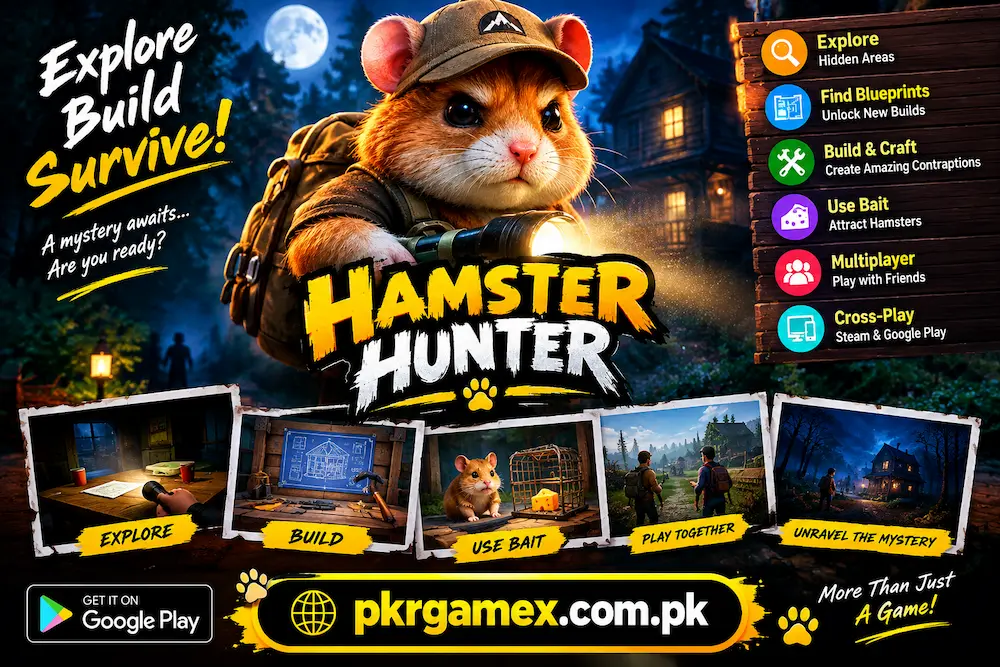
The main story begins with a family mystery. The player returns home for a family gathering but discovers that the family members are missing. A message left behind becomes the first clue, encouraging the player to explore the surrounding areas and find out what happened.
What makes the game interesting is that it does not depend only on completing straightforward missions. Players can explore the map, search for blueprints, collect useful resources, purchase equipment, and build different contraptions. The combination gives the game a more open and experimental feel.
What Is Hamster Hunter?
Hamster Hunter is a first-person adventure game with mystery and horror-style elements. Players move around different areas, investigate locations, search for clues, and interact with various objects found throughout the environment.
The game has a simple central mystery, but exploration is an important part of the experience. Instead of following one fixed path all the time, players can look around for useful discoveries and blueprints that unlock additional building possibilities.
The game also includes a bait system that can be used to attract hamsters. This adds another small strategy element and makes the gameplay more than just walking around and completing objectives.
Hamster Hunter Game Information
| Feature | Details |
|---|---|
| Game Name | Hamster Hunter |
| Genre | Adventure / Horror / Exploration |
| Perspective | First-person |
| Main Theme | Mystery and exploration |
| Platform | Android and PC |
| Android Publisher | Hamuno |
| Package Name | com.Hamuno.HamsterHunter |
| Multiplayer | Online co-op |
| Cross-Play | Steam and Google Play |
| Android Store | Google Play |
The Android release is listed as a paid game on Google Play, so users should check the current store information before installing or purchasing it.
Story and Gameplay
The story gives players a clear reason to start exploring. The main character arrives home expecting a normal family gathering, but nobody is there. Instead, the player finds a message that starts the investigation.
From that point, the gameplay revolves around exploring the environment and finding information. Players can inspect different locations, search for useful objects, and gradually understand the situation.
The story itself is not overly complicated. Much of the enjoyment comes from discovering how the game’s systems work. Searching for blueprints, buying equipment, setting up contraptions, and using bait all give players different things to experiment with.
This makes Hamster Hunter suitable for people who prefer games where exploration is part of the fun rather than simply moving from one level to the next.

Main Features of Hamster Hunter
First-Person Exploration
The first-person camera places the player directly into the game environment. You see the surroundings from the character’s viewpoint while moving through different areas.
This perspective works particularly well with the mystery atmosphere. Players need to pay attention to their surroundings because important objects, locations, or blueprints may not always be directly in front of them.
Mystery-Based Story
The missing-family storyline provides the main purpose behind the adventure. Instead of starting with random tasks, players have a reason to investigate the environment.
As you explore, the story gradually gives you more information about the situation. This keeps curiosity involved while you learn how the game world works.
Blueprint System
Blueprints are an important part of progression. Players can discover them while exploring the map, and they can unlock additional building options.
This gives exploration a practical purpose. Checking different areas is not simply about seeing the environment; a hidden location may contain something that becomes useful later.
Building and Contraptions
One of the more unusual parts of the game is its building system. Players can purchase equipment and create different contraptions around the environment.
Rather than forcing everyone to use exactly the same approach, the system allows some experimentation. New players may need a little time to understand what each item does before creating more complicated setups.
Bait System
The bait mechanic gives players another way to interact with the hamsters. Bait can be used to attract them instead of simply searching everywhere.
Although it is a relatively simple feature, it adds a small strategic element. Players can learn when and where different tools are useful as they become more familiar with the game.
Multiplayer and Cross-Play
Multiplayer makes the experience more interesting for players who prefer playing with friends. The game supports online co-op, while the newer cross-play functionality allows supported Steam and Google Play players to connect across platforms.
According to the provided source, cross-play support between Steam and Google Play was introduced in a September 2026 update.
Hamster Hunter on Android
The official Android version gives mobile users another way to experience the game. The provided information identifies Hamuno as the developer and lists the Android package as com.Hamuno.HamsterHunter.
The game is available through Google Play, and the listing identifies it as a paid title. It also carries a Teen rating. Players should remember that despite the hamster-focused name, this is not a traditional cute pet-care game. It contains dark and horror-style themes.
Android Version Details
| Android Detail | Information |
|---|---|
| Developer | Hamuno |
| Package | com.Hamuno.HamsterHunter |
| Distribution | Google Play |
| Price Type | Paid |
| Content Rating | Teen |
| Gameplay | First-person adventure |
Because mobile games can receive updates, it is better to check the official store listing for the latest compatibility and version information before installation.
How to Download Hamster Hunter on Android?
Getting the official version on Android is relatively simple. Open Google Play on your phone and search for the game by its exact name.
Before purchasing or installing it, check the developer name and make sure the listing corresponds to Hamuno. This helps avoid downloading an unrelated application with a similar name.
After purchasing the game, select the installation option and wait for Google Play to complete the process. It is also a good idea to keep enough free storage available on the phone.
Simple Installation Steps
- Open Google Play Store on your Android device.
- Search for Hamster Hunter.
- Check the developer information.
- Review the current game details and price.
- Purchase the game if required.
- Tap the installation option.
- Wait until the installation finishes.
- Open the game and begin exploring.
The provided source specifically recommends checking available storage and the supported Android version before installation.
How to Start Playing?
New players should avoid rushing through the opening section. Spend some time learning movement, camera controls, and basic interactions.
Once you are comfortable with movement, start exploring nearby locations. Look for clues, objects, and blueprints rather than concentrating only on the main objective.
The game rewards curiosity. A little extra exploration can help you understand the map and discover useful items that may become important later.
After learning the basic controls, start experimenting with building and bait. Understanding one system at a time makes the overall experience much easier.
Explore the Map Carefully
Exploration is one of the strongest parts of the game. Important discoveries can be spread around the environment, so following only the obvious route may cause you to miss useful items.
Check buildings, side paths, corners, and less noticeable areas. When you discover an important location, remember where it is. Knowing the map can make later movement much faster.
Blueprint hunting is especially useful because these discoveries can expand your available building options.
Learn the Building System
The building mechanics may take some time to understand, especially for first-time players.
Start with the basic equipment and learn what each object does. Once you understand individual items, you can begin testing different combinations and placements.
There is no need to unlock or experiment with everything immediately. Learning gradually can make the progression easier and help prevent unnecessary resource use.
Mobile Controls
Players who are familiar with PC games may need some time to adjust to touchscreen controls. First-person movement on a phone can feel different from playing with a keyboard and mouse.
Start with the default control setup and test movement, camera rotation, and interaction. After spending some time in the game, adjust the settings according to your comfort.
Good control settings can make exploration less frustrating, particularly when you need to look around carefully or interact with objects.
Graphics and Game Environment
The game uses a stylized 3D visual approach rather than aiming for complete realism. This design fits its unusual theme and gives the environment a distinctive appearance.
Dark areas and lighting contribute to the horror-style atmosphere. At the same time, the unusual situations and hamster-related mechanics give the game a lighter and sometimes humorous side.
This mixture of strange, dark, and playful elements is one reason the game feels different from a typical mobile adventure title.
Advantages of Hamster Hunter
There are several reasons players may want to try this game.
- First-person exploration gives a direct view of the environment.
- The mystery provides a reason to investigate different locations.
- Blueprint discovery adds purpose to exploration.
- Building mechanics offer room for experimentation.
- The bait system adds another gameplay option.
- Online co-op can make the experience more social.
- Cross-play connects supported mobile and PC players.
- The unusual theme helps the game stand out.
The biggest advantage is the combination of different mechanics. Players are not limited to one repeated activity throughout the entire experience.
Things to Know Before Playing
The name may make some people expect a simple animal game, but the actual experience is quite different. It contains mystery, dark themes, and horror-style elements.
The Android release is also newer than the original PC version. As with many newer mobile releases, future updates may improve compatibility or performance.
For this reason, players should check the official store information before purchasing or installing the game. Version details and compatibility requirements can change with updates.
Tips for New Players
A few simple habits can make the early experience easier:
| Tip | Why It Helps |
|---|---|
| Explore slowly | You are less likely to miss clues or blueprints |
| Learn controls first | Makes movement and interaction easier |
| Search side areas | Useful discoveries may be away from the main route |
| Understand equipment | Helps with building and resource use |
| Remember important locations | Makes future exploration quicker |
| Check game updates | Keeps multiplayer and compatibility information current |
Most importantly, do not feel the need to rush. A large part of the experience comes from discovering how the different systems work.
Is Hamster Hunter Worth Playing?
Hamster Hunter is worth considering if you enjoy indie games that mix several gameplay ideas instead of focusing on one traditional formula.
Players who like first-person exploration, mystery stories, building systems, and unusual environments may find something enjoyable here. The game is especially different from ordinary mobile titles because its hamster theme is combined with a darker adventure setting.
The Android release also makes the game available to mobile players, while cross-play provides an option for supported Steam and Google Play users to play together.
On the other hand, players looking for a straightforward pet simulator or a simple casual game may not get what they expect from the title.
FAQs
Is Hamster Hunter available on Android?
Yes. An official Android version is available through Google Play.
Who developed Hamster Hunter?
The game is developed by Hamuno, which is also listed as the publisher of the Steam version.
Does Hamster Hunter support multiplayer?
Yes. The game includes online co-op, and the provided source states that cross-play between Steam and Google Play was introduced in a September 2026 update.
Can I play Hamster Hunter on PC?
Yes. The game is available on Steam for supported desktop systems.
Does Hamster Hunter have a story?
Yes. The story begins when the main character arrives for a family reunion and discovers that the family has disappeared.
Conclusion
Hamster Hunter brings together first-person exploration, mystery, building, blueprint discovery, bait mechanics, and multiplayer features in one unusual adventure. Its missing-family storyline gives the player a reason to investigate, while the building and exploration systems provide activities beyond simply following missions.
The official Android release makes the game easier to access for mobile players, and cross-play adds another useful option for people who want to play with friends on supported platforms.
If you enjoy unusual indie adventures and like discovering things at your own pace, this game can be an interesting option. Take time to understand the map, search for blueprints, learn the building system, and experiment with the available tools rather than rushing through the story.
Download links
How to install Hamster Hunter APK?
1. Tap the downloaded Hamster Hunter APK file.
2. Touch install.
3. Follow the steps on the screen.