
VidMate APK
Just Now
8.65 MB
v2.1.95
Android 6+
112K
Description
People often save videos, music, social media clips, and other online media for offline use. VidMate APK is an Android-focused media downloader that has been designed around this type of use. It combines downloading, media playback, format selection, and file management in one application.
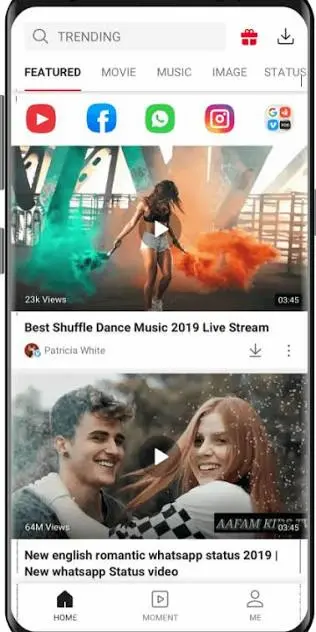
The official VidMate website says the app can work with content from platforms such as YouTube, Facebook, Instagram, TikTok, WhatsApp, Dailymotion, Vimeo, and other supported websites. It also advertises several video qualities and formats, including MP4, MP3, WEBM, JPEG, and PNG. Availability can depend on the source website, region, and the content itself.
Before installing an APK from outside Google Play, however, users should check where the file comes from and review Android security warnings. Independent reviews note that different VidMate-branded websites and APK sources exist, making source verification important.
What Is VidMate APK?
VidMate APK is an Android application mainly focused on downloading and playing online media. Instead of using separate applications for downloading and playback, it provides several related functions inside one interface.
According to its official website, users can browse supported services, select available quality options, and save compatible content to their device. The platform also promotes offline playback, background activity, and a built-in media player.
The application is distributed as an APK rather than through the normal Google Play installation process. VidMate’s own FAQ says it is not listed on Google Play because of platform policy restrictions.
VidMate APK Information
| Item | Information |
|---|---|
| App name | VidMate |
| Platform | Android |
| Main purpose | Video and media downloading |
| Distribution | APK |
| Google Play | Not officially listed |
| Video quality | Up to 4K where supported |
| Common formats | MP4, MP3, WEBM, JPEG, PNG |
| Playback | Built-in media player |
| Offline use | Supported for downloaded files |
| Registration | Not generally required for basic use |
The exact APK version, package details, and supported Android version can change with new releases. For that reason, users should check the information displayed by the source hosting the file instead of relying on old specifications.

Main Features Of VidMate APK
Video Downloading
The central purpose of VidMate is saving supported online videos to an Android device. The official website advertises compatibility with numerous popular platforms. However, support for a particular website does not mean every video can always be downloaded. Login requirements, DRM, regional restrictions, or changes made by the source platform can affect availability.
Different Quality Options
The official site lists options ranging from lower resolutions such as 360p and 480p to HD, 2K, and 4K when the original source provides them. Higher-quality files normally require more storage space and data.
This gives users the ability to choose between file size and picture quality rather than downloading every video at the highest available setting.
Music and Audio Downloads
The app also promotes audio downloading and MP3 conversion. This can be useful when a supported source provides an audio option. The official website currently advertises high-quality MP3 downloads, while other pages mention several audio choices.
Users should remember that downloading copyrighted music without permission may violate the rights of the content owner.
Built-In Player
Another useful part of the application is its media player. Official information describes video and music playback, background play, playlists, and offline viewing. This means downloaded files can be accessed without opening a separate player.
Background Downloads
VidMate also promotes background downloading. This can be useful when a large file is being saved while the user performs another task on the phone. Actual performance depends on device resources, internet speed, server availability, and Android restrictions.
Social Media Media Support
The official website lists services including Facebook, Instagram, TikTok, WhatsApp and other websites. Some versions also provide tools for saving WhatsApp Status content.
Because online platforms frequently change their systems, users should not assume that every supported website will work permanently.

How to Download VidMate APK?
Since the app is generally distributed outside Google Play, installation is different from a normal Play Store application.
A basic process is:
- Find the publisher’s current download page.
- Check that the website and APK source are genuine.
- Download the APK file.
- Open the downloaded file through Android’s file manager.
- If Android asks for permission to install from that source, review the permission carefully.
- Install the application if you trust the source.
- Keep Google Play Protect enabled.
- Open the app and review its permissions before using it.
Modern Android versions use per-app permission controls for installing applications from unknown sources. Independent guidance recommends avoiding suspicious APK files and not disabling Play Protect simply to force an installation.
Is VidMate APK Safe?
This is an important question because APK applications obtained outside Google Play require additional attention.
VidMate’s own website describes its official APK as safe, while independent security-focused reviews take a more cautious position because users may encounter unofficial, modified, or repackaged files. One recent review specifically notes that the existence of different VidMate-branded download sites makes it difficult to treat every APK as equally trustworthy.
Therefore, users should not assume that every file named “VidMate APK” is genuine.
Before installation, check:
- The website address where the file comes from
- Whether the APK has been modified or labeled as a “Mod”
- Android’s security warning
- Requested app permissions
- Google Play Protect results
- Available storage and device compatibility
- Whether the application really needs each requested permission
If Play Protect identifies a problem, it is better to investigate the warning than to disable the security feature.
Downloading Copyrighted Content
A downloader can make it technically easy to save online content, but technical ability and legal permission are not the same thing.
Users should download material when they have the right or permission to save it. Content protected by copyright, platform rules, DRM, or other restrictions may not be legally available for downloading.
This is especially important for movies, television programs, paid courses, music, and other commercial material.
VidMate APK Advantages and Limitations
| Advantages | Limitations |
|---|---|
| Multiple media functions in one app | Not distributed through Google Play |
| Several quality choices | APK installation requires extra care |
| Supports different media formats | Website compatibility can change |
| Offline playback | Large HD files use more storage |
| Built-in media player | Unofficial APKs can create security concerns |
| Background download features | Copyright rules still apply |
Common Problems
Download Does Not Start
First check the internet connection and available storage. A source website may also have changed its download system. Restarting the application and trying another supported source can help identify whether the problem is local or source-related.
APK Will Not Install
Check whether the file completed downloading and whether Android permits installation from the specific browser or file manager being used. On newer Android versions, this permission is controlled separately for individual apps.
Video Quality Is Missing
Not every source provides every resolution. If a video is available only in 480p, for example, a downloader cannot normally create a genuine 1080p version from unavailable source data.
Downloaded File Cannot Play
Check the file format and whether the download completed correctly. Free storage should also be checked because incomplete files can result from insufficient space.
Final Thoughts
VidMate is designed as an Android media downloader with features covering video downloads, audio extraction, quality selection, offline playback, and built-in media management. Its official pages advertise support for many online services and resolutions reaching 4K where available.
At the same time, users should treat APK installation differently from installing an application through Google Play. The most important step is verifying the source and keeping Android security protections active. Independent reviews have raised concerns about unofficial or modified copies, so downloading the first APK found through a search result is not a good practice.
For anyone considering VidMate, the sensible approach is to verify the source, check permissions, respect copyright and platform rules, and keep the device protected while using the application.
Download links
How to install VidMate APK APK?
1. Tap the downloaded VidMate APK APK file.
2. Touch install.
3. Follow the steps on the screen.