
MYCash
Just Now
18MB
v1.1.1
Android 6+
11K
Description
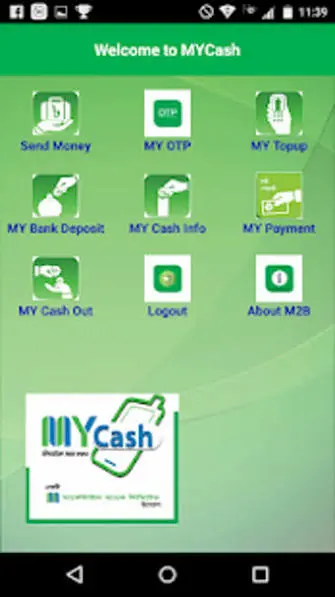
Managing everyday money through a mobile phone can save time and make common financial tasks easier. MYCash is a mobile financial service associated with Mercantile Bank PLC in Bangladesh. Its listed services include sending money, mobile recharge, bank deposits, payments, cash-out facilities, and fund transfers. The MYCash Android application allows users to access its supported services from a compatible phone, subject to account eligibility and the provider’s current rules.
What Is MYCash App?
MYCash is a mobile financial service created to make digital transactions more accessible to people across Bangladesh. It connects users with financial services offered through Mercantile Bank’s mobile banking system.

Rather than visiting a bank counter for every eligible transaction, customers can use supported mobile channels for everyday money management. Depending on the service available to their account, they may be able to send funds, make payments, recharge a mobile phone, or withdraw money through authorized channels.
MYCash is a financial service, not a task-based earning game. It is intended for managing money and completing supported transactions rather than promising rewards for playing games or completing online activities. also explore DoEarn apk.
MYCash App Information
| App detail | Information |
|---|---|
| App name | MYCash |
| Developer | Mercantile Bank Ltd. |
| Category | Finance |
| Platform | Android |
| Main purpose | Mobile financial services |
| Listed services | Send money, recharge, deposits, payments, cash-out and fund transfer |
| Official download source | Google Play Store |
| Country focus | Bangladesh |
App details and available services can change over time. Check the current Google Play listing for the latest version, compatibility information, and developer details before installing.
Main Features of MYCash
MYCash brings several financial functions together in one mobile service. The features below are listed by Mercantile Bank or in the official app description; the availability of each option may depend on your account and current service arrangements.
1. Send Money
Money transfer facilities help eligible users move funds through supported channels. This can be useful for family payments and other personal financial needs. Always confirm the recipient’s details before authorizing a transfer.
2. Cash-In Facility
Cash-in allows customers to add funds to their mobile financial account through an authorized channel. Before completing a transaction, confirm the correct account information, any applicable fees, and the amount you intend to deposit.
3. Cash-Out Service
Cash-out enables eligible customers to withdraw available money through supported service channels. Users should check the authorized withdrawal process, transaction limits, and charges before requesting cash.
4. Mobile Recharge
MYCash lists mobile recharge among its main services. Customers can check the application to see the supported recharge options and follow the displayed instructions to complete an eligible transaction.
5. Bank Deposit
The bank deposit feature provides access to supported deposit services. Before using it, check the destination account details, eligibility requirements, and any applicable transaction conditions.
6. Fund Transfer and Payments
MYCash also lists fund transfer and payment services. These options can help users handle eligible financial transactions from their mobile devices without relying entirely on in-person banking.
7. Savings-Related Services
Mercantile Bank’s MYCash service information also mentions MY DPS, a savings-related offering. Customers interested in this option should check the current terms, deposit schedule, eligibility criteria, and other conditions directly with the provider.
How to Download MYCash APK for Android
The simplest option for Android users is to check the official Google Play listing instead of downloading an APK from an unfamiliar website.
Follow these steps:
- Open the Google Play Store on your Android phone.
- Visit the MYCash official Google Play page.
- Confirm that the developer is Mercantile Bank Ltd.
- Review the app information and compatibility details.
- Tap Install if the application is available for your device.
- Wait for installation to finish, then open the app.
- Follow the available account access or registration instructions.
If you search for MYCash APK download, make sure the file or download page is genuinely connected to the official provider. An APK obtained from a third-party website may be outdated, modified, or unsafe. Avoid installing files that ask for unnecessary permissions or request confidential banking details outside the official process.
How to Register for MYCash
New customers should follow the registration procedure currently provided by MYCash. The exact steps may vary according to the account-opening method and verification requirements.
A general approach is:
- Open the official MYCash application or contact an authorized service point.
- Select the available registration or account-opening option.
- Enter the requested mobile number and personal information.
- Provide the required identification details.
- Complete any identity checks or verification steps.
- Set up the required PIN or other security credentials.
- Follow the confirmation instructions shown by the service.
Use accurate information and keep your registered mobile number accessible. If registration fails or a verification message does not arrive, contact official support rather than repeatedly submitting personal details through unfamiliar websites.
MYCash Login: How to Access Your Account
Registered customers can use the login method provided by the official application to access available services.
Open MYCash and enter the requested credentials. Complete any verification step shown on the screen. Once access is confirmed, review your account information before starting a transaction.
If you forget your PIN, use the official recovery procedure. Never share your PIN, one-time password (OTP), or other confidential authentication information with another person, even if they claim to represent customer support.
How to Add Money to a MYCash Account
Customers who need to fund their account should use an authorized MYCash cash-in channel.
- Check the current cash-in instructions.
- Confirm the correct account or mobile number.
- Ask about any transaction charges before proceeding.
- State the amount you want to add.
- Follow the authorized transaction procedure.
- Keep the confirmation message or transaction reference.
- Check your balance to ensure the funds have arrived.
Do not hand over money until you understand the process and have confirmed that the service point is authorized.
How to Withdraw Money Using MYCash
The cash-out service is intended to help eligible customers access their available funds through supported channels.
First, check the current withdrawal instructions and locate an authorized service point if an agent transaction is required. Confirm the amount and applicable charges, then follow the official authorization process. After completion, check the transaction confirmation and count any cash received.
If the transaction is pending or the balance changes unexpectedly, retain the transaction reference and contact official customer support before attempting the same withdrawal again.
MYCash Charges, Limits and Availability
Transaction costs and limits are important when choosing a mobile financial service. A transfer, deposit, payment, or withdrawal may have different conditions depending on the transaction type and account.
Do not rely on an old blog post for current fees. Review the latest MYCash terms or ask the provider before making a large transaction. Also confirm that the particular service is available for your account and intended destination.
Is MYCash Safe to Use?
MYCash is associated with Mercantile Bank PLC, and Bangladesh Bank lists MYCash among the country’s mobile financial service providers. However, customers should still take practical steps to protect their accounts.
- Download the app through the official store listing.
- Keep your PIN and OTP confidential.
- Check recipient details before confirming payments.
- Use authorized agents and service channels.
- Avoid public Wi-Fi when handling sensitive financial transactions.
- Never follow payment instructions from suspicious messages.
- Keep a record of transaction references and report unfamiliar activity promptly.
The security of an individual transaction also depends on how the account and device are used. An official app does not remove the need for careful account protection.
Common MYCash Problems and Possible Solutions
Registration is not completing: Check the information entered and follow the verification instructions. Contact support if the process remains unsuccessful.
OTP is not arriving: Confirm that your registered SIM is active and can receive messages. Wait briefly before requesting another code.
Login is unsuccessful: Recheck your credentials and use the official recovery method if needed.
A transfer is delayed: Check the transaction status and retain the reference number. Avoid repeating the payment until you know whether the first request succeeded.
Cash-in or cash-out is not reflected: Check your balance and confirmation message, then contact the provider with the transaction details.
Advantages of MYCash
- Offers multiple listed financial services through mobile banking.
- Supports eligible money transfers and payments.
- Includes mobile recharge and cash-out options.
- Provides access to supported deposit and fund transfer services.
- Can reduce the need to visit a bank counter for every eligible transaction.
Points to Check Before Using MYCash
- Registration and identity verification may be required.
- Not every feature will necessarily be available to every customer.
- Transaction charges and limits may apply.
- Access can depend on network availability and service status.
- Users should confirm current instructions before sending or withdrawing money.
Final Verdict
MYCash is a mobile financial service for users in Bangladesh who want access to supported digital money transactions. Its listed features include send money, mobile recharge, bank deposit, payments, cash-out, and fund transfer. Mercantile Bank also describes additional services, including MY DPS.
For anyone searching for MYCash APK, the safest starting point is the official Google Play listing. Check the developer name, review the current app information, and follow the provider’s instructions for registration and account access. Before completing a financial transaction, confirm the recipient, applicable fees, and transaction status.
Frequently Asked Questions
What is MYCash used for?
MYCash is a mobile financial service associated with Mercantile Bank PLC in Bangladesh. Its listed functions include money transfers, mobile recharge, bank deposits, payments, and cash-out.
Where can I download MYCash APK?
Android users can check the official MYCash listing on Google Play. Confirm the developer before installing the application.
Can I earn money by using MYCash?
MYCash is designed for financial transactions and money management. It should not be treated as a task-based earning app or a source of guaranteed income.
Does MYCash support mobile recharge?
Yes. Mobile recharge is included among the services listed in the official app description. Check the application for current availability and instructions
Can I send and withdraw money through MYCash?
MYCash lists send-money and cash-out services. Eligibility, transaction limits, fees, and the available process should be confirmed with the provider before use.
Download links
How to install MYCash APK?
1. Tap the downloaded MYCash APK file.
2. Touch install.
3. Follow the steps on the screen.